Visit PM Intelli Hub YouTube Channel

AI-Powered Skills for Project Managers

Why Prompt Engineering Matters for Project Managers

Artificial intelligence is becoming a practical tool in modern project environments, supporting planning, reporting, forecasting, and decision-making. However, many professionals quickly realize that simply using AI does not guarantee useful results. The real differentiator is prompt engineering for project managers—the ability to clearly instruct AI tools to produce structured, reliable, and relevant outputs.

For project managers, prompt engineering is not a technical exercise. Instead, it builds on familiar skills such as defining scope, setting constraints, and communicating expectations. When applied correctly, prompt engineering allows AI to enhance project controls rather than introduce uncertainty.


What Is Prompt Engineering for Project Managers?

Prompt engineering is the discipline of structuring requests so AI tools understand the task, context, and constraints before generating an output.

In project management terms, a prompt functions much like:

  • A scope statement
  • A task assignment
  • A request for analysis

Without structure, AI produces generic responses. With structure, it delivers insights aligned with project objectives.

This mirrors the principles behind effective project controls, where defined inputs lead to predictable results.
👉 https://pmintelli.com/project-control-explained-the-foundation-of-successful-project-management/


Why Prompt Engineering Matters in Project Management

AI does not independently evaluate project priorities. It responds to how instructions are framed. When prompts lack clarity, outputs often ignore cost, schedule, risk, or stakeholder considerations.

Prompt engineering matters because it helps project managers:

  • Reduce time spent drafting documents
  • Improve consistency across reports
  • Identify risks earlier
  • Support data-informed decisions
  • Maintain control over AI-assisted work

Rather than replacing judgment, prompt engineering strengthens it.


Prompt Engineering as a Natural Extension of PM Skills

Project managers already rely on structured thinking throughout the project life cycle. Prompt engineering applies the same logic to AI interaction.

Project Management PracticePrompt Engineering Equivalent
Scope definitionClear task instruction
ConstraintsBudget, schedule, resources
AssumptionsProject context
DeliverablesOutput format
Quality standardsLevel of detail

Because of this alignment, prompt engineering fits naturally within PM and PMO environments.
👉 https://pmintelli.com/what-is-a-pmo-roles-types-and-benefits-explained/


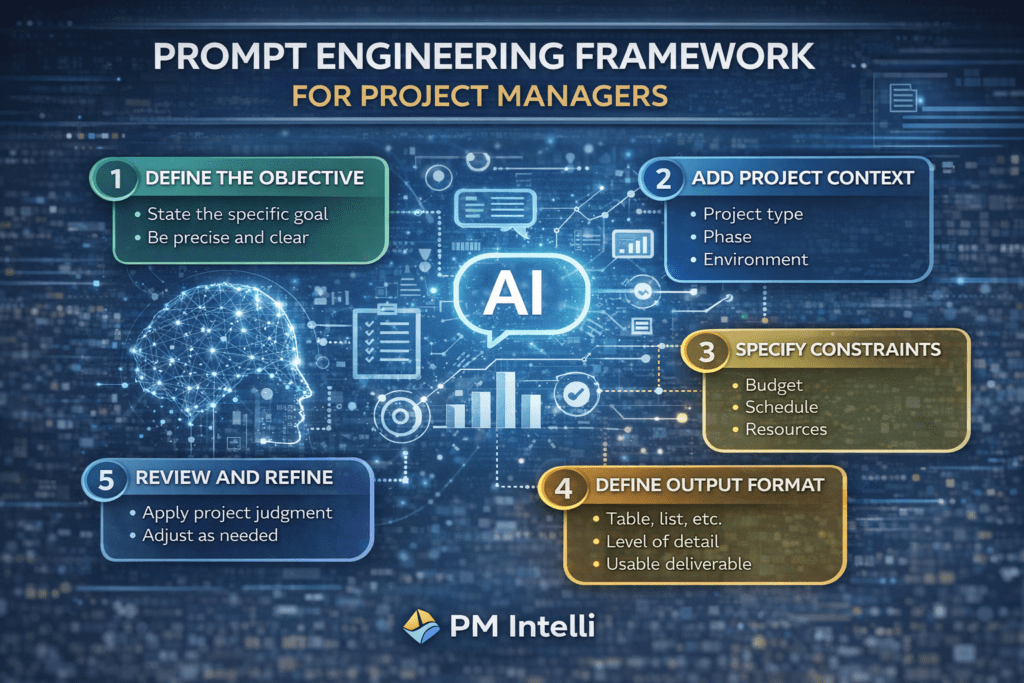
Step-by-Step: How Project Managers Should Engineer Prompts
Why Prompt Engineering Matters

Step 1: Define the Objective Clearly

Begin with a precise goal.

Weak prompt:
Create a project plan.

Strong prompt:
Create a high-level project plan for a 12-month municipal infrastructure project, including major milestones and assumptions.


Step 2: Provide Project Context

Context helps AI understand complexity and priorities. Include:

  • Project type
  • Current phase
  • Regulatory or stakeholder constraints

This is especially important when supporting different phases of the project life cycle.
👉 https://pmintelli.com/the-complete-guide-to-the-project-life-cycle-with-real-examples/


Step 3: State Constraints Explicitly

Constraints guide AI outputs toward practical solutions. Examples include:

  • Fixed budgets
  • Limited resources
  • Safety or regulatory requirements

Step 4: Specify the Output Format

AI delivers better results when expectations are clear.

Examples:

  • Tables for risk registers
  • Bullet points for action items
  • Dashboards for cost tracking

Step 5: Review and Refine

AI outputs should always be reviewed and adjusted using professional judgment. Prompt engineering supports decision-making—it does not replace accountability.


Real-World Applications of Prompt Engineering

Engineering Projects: Risk Identification

For large engineering or infrastructure projects, AI can help identify early-stage risks when guided by structured prompts.

Example use:

  • Define scope, duration, and constraints
  • Request categorized risks with mitigation strategies

👉 https://pmintelli.com/developing-a-project-risk-register-using-ai/


PMO Reporting and Governance

PMOs benefit from standardized prompts that generate consistent status reports and summaries across multiple projects.

This improves governance while reducing administrative effort.
👉 https://pmintelli.com/what-is-a-pmo-roles-types-and-benefits-explained/


Cost Management and Budget Dashboards

Prompt engineering enables AI to assist with:

  • Cost trend explanations
  • Forecast narratives
  • Dashboard KPI definitions

These outputs support cost control without bypassing controls.
👉 https://pmintelli.com/how-to-create-a-project-budget-dashboard-step-by-step-guide-for-project-managers/


Common Prompt Engineering Mistakes to Avoid

Even experienced project managers can misuse AI if prompts are poorly designed. Common mistakes include:

  • Asking vague questions
  • Ignoring constraints
  • Accepting outputs without validation
  • Treating AI as a decision-maker

Prompt engineering helps reduce these risks by enforcing structure and clarity.


Practical Prompt Engineering Tips for Project Managers

  • Treat AI like a junior analyst
  • Include scope, constraints, and assumptions
  • Request outputs aligned with PM deliverables
  • Save effective prompts for reuse
  • Apply project controls thinking to every prompt

For ready-to-use examples, see:
👉 https://pmintelli.com/beyond-chatgpt-essential-ai-prompts-every-project-manager-should-master/


Strategic Value of Prompt Engineering for PMs

Prompt engineering is quickly becoming a baseline competency for project managers.

Professionals who master it:

  • Work more efficiently
  • Communicate more clearly
  • Improve decision quality
  • Lead AI-supported teams responsibly

As AI adoption grows, the ability to guide it effectively will distinguish high-performing PMs.


Conclusion: Prompt Engineering Is About Control, Not Technology

Prompt engineering for project managers is not about mastering AI tools—it is about maintaining control.

The same principles that define good project management—clarity, structure, and accountability—also define effective prompt engineering. Project managers who adopt this skill will be better positioned to lead projects where AI plays an increasing support role.
What Is AI Prompt Engineering — Non-Technical Guide

Artificial Intelligence is rapidly becoming part of everyday project management—from drafting reports and schedules to analyzing risks and budgets. Yet many project managers feel uncertain about how to get reliable results from AI tools.

The answer lies in AI prompt engineering.

This guide explains AI prompt engineering in simple, non-technical terms, specifically for project managers, PMOs, and project controls professionals. No coding required—just structured thinking.


What Is AI Prompt Engineering?

AI prompt engineering is the practice of writing clear, structured instructions (called prompts) that guide an AI tool to produce accurate, useful, and relevant outputs.

A prompt is simply what you ask the AI to do.

For example: - “Create a project schedule” ❌ (too vague) - “Create a high-level project schedule for a 12-month water infrastructure project using CPM milestones” ✅ (well-engineered prompt)

Prompt engineering is not technical—it is intentional communication.


Why Project Managers Need Prompt Engineering Skills

Project managers already work in structured environments: - Scope definitions - Work breakdown structures (WBS) - Risk registers - Cost baselines - Status reports

AI works best when given the same level of structure.

Without prompt engineering, AI outputs may be: - Generic - Inaccurate - Misaligned with project constraints - Risky from a governance perspective

With good prompts, AI becomes a reliable project support tool.


Prompt Engineering vs. Traditional Project Communication

Prompt engineering is similar to how PMs already communicate:

Project Management SkillAI Prompt Equivalent
Scope definitionPrompt objective
Assumptions & constraintsPrompt context
DeliverablesOutput format
Stakeholder needsTone & perspective

If you can write a scope statement, you can write a good AI prompt.


What Makes a Good AI Prompt?

A strong prompt answers four basic questions:

  1. Who is the AI acting as?
    (e.g., scheduler, cost engineer, PMO analyst)
  2. What is the task?
    (e.g., develop a risk register, summarize performance)
  3. What context matters?
    (project type, duration, constraints, assumptions)
  4. What should the output look like?
    (table, bullets, executive summary)

The clearer the prompt, the better the output.


Example: Poor Prompt vs. Well-Engineered Prompt

Poor Prompt:
“Analyze project risks.”

Well-Engineered Prompt:
“Act as a project risk manager. Identify top risks for a 24-month transportation infrastructure project, categorize them by cost, schedule, and safety, and present them in a risk register table with mitigation strategies.”

The second prompt produces structured, actionable results.


Common AI Prompt Engineering Mistakes by Project Managers

Even experienced PMs make these mistakes:

  • Asking vague or open-ended questions
  • Forgetting to provide project context
  • Not specifying output format
  • Treating AI as a decision-maker instead of an assistant
  • Copying sensitive or confidential data into prompts

Prompt engineering helps reduce these risks.


How AI Prompt Engineering Fits into the Project Life Cycle

AI prompts can support every phase of a project:

Initiation

  • Drafting project charters
  • Identifying high-level risks

Planning

  • Developing WBS structures
  • Creating schedules and budgets

Execution

  • Generating status reports
  • Tracking issues and risks

Monitoring & Control

  • Analyzing cost and schedule trends
  • Forecasting outcomes

Closing

  • Lessons learned documentation
  • Final performance summaries

Prompt engineering ensures AI outputs remain aligned with each phase.


Do Project Managers Need Technical Skills to Use AI Prompts?

No.

AI prompt engineering for project managers does not require: - Programming - Data science - Machine learning knowledge

It requires: - Logical thinking - Clear communication - Understanding of project management principles

In many ways, prompt engineering is an extension of professional PM skills.


Governance and Responsibility When Using AI Prompts

AI does not replace accountability.

Project managers remain responsible for: - Verifying AI-generated outputs - Ensuring data confidentiality - Applying professional judgment - Complying with organizational policies

Prompt engineering should always support—not replace—human decision-making.


The Strategic Value of Prompt Engineering for PMs

Project managers who master prompt engineering gain: - Faster document creation - Better insights from data - Improved consistency across projects - Reduced administrative workload - Stronger decision support

As AI adoption grows, prompt engineering will become a core PM competency.


Final Thoughts

AI prompt engineering is not a technical discipline—it is a communication skill.

For project managers, it represents a natural evolution of how we define scope, manage constraints, and deliver value.

By learning how to write clear, structured prompts, project managers can turn AI from a novelty into a trusted project partner.

Beyond ChatGPT: Essential AI Prompts

Artificial Intelligence is rapidly becoming a core capability in modern project management. While many professionals associate AI with tools like ChatGPT for writing emails or meeting notes, its real power goes far beyond basic text generation. When used correctly, AI can support planning, scheduling, risk management, cost control, stakeholder communication, and decision-making across the entire project life cycle.

The key is knowing how to ask the right questions.

In this guide, we go beyond surface-level use and explore essential AI prompts every project manager should master, complete with practical examples you can apply immediately.


Why Prompts Matter More Than the Tool

AI tools are only as effective as the instructions they receive. A vague request produces vague results, while a well-structured prompt can generate outputs that rival experienced project analysts.

Think of prompts as a new project management skill—similar to learning how to:

  • Write a solid project charter
  • Build a Work Breakdown Structure (WBS)
  • Develop a risk register
  • Perform schedule and cost analysis

The difference is that AI accelerates these tasks dramatically when guided properly.


1. AI Prompts for Project Initiation & Planning

During initiation and planning, project managers spend significant time defining scope, assumptions, constraints, and success criteria. AI can act as a planning assistant and brainstorming partner.

Example Prompt:

“Act as a senior project manager. Create a project charter for a mid-sized IT system implementation with a 9-month duration, fixed budget, and multiple stakeholders. Include objectives, scope, assumptions, risks, and success metrics.”

How This Helps:

  • Accelerates charter development
  • Ensures no critical sections are missed
  • Provides a structured starting point for stakeholder review

2. AI Prompts for Work Breakdown Structures (WBS)

Creating a clear and complete WBS is foundational to schedule, cost, and risk control. AI can generate structured breakdowns in seconds.

Example Prompt:

“Generate a Level 3 Work Breakdown Structure for a commercial building construction project. Organize it by major deliverables and include clear task descriptions.”

Advanced Tip:
Follow up with refinement prompts:

“Expand the ‘MEP Systems’ section to Level 4 tasks and assign responsible roles.”


3. AI Prompts for Scheduling & Critical Path Thinking

While AI does not replace scheduling software, it can support logic development and sequencing decisions.

Example Prompt:

“Based on this WBS, propose logical task sequencing and identify potential critical path activities for a 6-month project.”

Use Cases:

  • Logic validation
  • Schedule risk identification
  • Pre-scheduling workshops

This is especially useful before importing data into tools like Primavera P6, MS Project, or ProjectLibre.


4. AI Prompts for Risk Identification & Risk Registers

Risk management is one of the strongest use cases for AI because it can analyze patterns across similar projects and industries.

Example Prompt:

“Develop a risk register for a public infrastructure project. Include risk description, probability, impact, mitigation strategy, and risk owner.”

Follow-Up Prompt for Maturity:

“Categorize these risks into technical, schedule, cost, regulatory, and stakeholder risks.”

Result:
A structured, review-ready risk register that can be refined with the project team.


5. AI Prompts for Cost Estimation & Budget Control

AI can assist early-stage cost planning by identifying cost drivers and assumptions.

Example Prompt:

“Identify major cost components for a water infrastructure project and suggest cost-control strategies during execution.”

Important Note:
AI outputs should support — not replace — professional estimates. Always validate with historical data and estimators.


6. AI Prompts for Stakeholder Communication

AI excels at adapting communication to different audiences.

Example Prompt:

“Draft a project status update for executive stakeholders focusing on schedule, budget, and key risks. Keep it under 300 words.”

Bonus Prompt:

“Rewrite this update for a technical project team.”

This ensures clarity while saving time and reducing miscommunication.


7. AI Prompts for Lessons Learned & Continuous Improvement

Post-project reviews are often rushed or skipped. AI can help structure lessons learned effectively.

Example Prompt:

“Create a lessons learned summary based on common issues in similar projects and suggest process improvements for future initiatives.”

This supports PMO maturity and organizational learning.


Best Practices for Using AI Responsibly in Projects

To get the most value from AI prompts:

  • Be specific about project type, size, and constraints
  • Use AI as a decision-support tool, not a decision-maker
  • Validate outputs with subject-matter experts
  • Avoid sharing sensitive or confidential data
  • Document AI-assisted decisions where required by governance

The Strategic Advantage for Project Managers

Mastering AI prompts is quickly becoming a competitive advantage for project managers. Those who can combine human judgment, leadership, and ethics with AI-powered insights will deliver better outcomes, faster planning cycles, and stronger stakeholder confidence.

AI will not replace project managers—but project managers who use AI effectively will replace those who don’t.


🚀 Final Thought

Start small. Pick one area—planning, risk, or communication—and integrate AI prompts into your next project. Over time, you’ll build a personal prompt library that enhances your effectiveness across every phase of the project life cycle.

(Artificial intelligence tools contributed to the development of this article.)

Top AI Tools for Construction Project Control

The theory of AI is great, but which tools can you actually deploy on your job site today?

The market is flooded with "AI-powered" labels. For Project Controls—where accuracy is paramount—we need tools that move the needle on Schedule, Cost, and Risk.

Here is a curated list of the leading AI tools currently reshaping project control, categorized by their primary function.

1. Schedule Optimization & Recovery

These tools don't just display the Critical Path; they optimize it.

ALICE Technologies

  • Best For: Complex infrastructure, industrial, and large commercial projects.
  • The "Magic": Generative Scheduling. You input your constraints (crew size, cranes, zones) and the AI simulates millions of schedule variations.
  • Project Control Use Case:
    • Recovery Schedules: When you are 3 weeks behind, instead of manually dragging bars in P6, you ask ALICE: "Show me the most cost-effective way to recover 3 weeks by adding overtime only to the concrete crews." It generates the optimal path instantly.

nPlan

  • Best For: Schedule Assurance and Risk Analysis.
  • The "Magic": Deep Learning. nPlan has trained its AI on over 700,000 past construction schedules. It looks at your schedule and predicts the probability of delay for every single activity based on historical reality, not human optimism.
  • Project Control Use Case:
    • Risk Defense: Before you submit a baseline to the owner, run it through nPlan. It might flag: "You have allowed 10 days for 'Steel Erection', but historically, similar projects in this region take 14 days 85% of the time."

Oracle Construction Intelligence Cloud (CIC)

  • Best For: Users deeply embedded in the Oracle ecosystem (Primavera P6/Unifier).
  • The "Magic": Predictive Intelligence. It analyzes your own organization's historical P6 data to predict future performance.
  • Project Control Use Case:
    • Early Warning: It acts as a "Check Engine Light" for your project portfolio, flagging projects that are trending towards delay long before the CPI/SPI indicators turn red.

2. Visual Project Control (Reality Capture)

These tools automate the "Percent Complete" update.

Buildots

  • Best For: Interior fit-outs and complex vertical construction.
  • The "Magic": Hardhat-mounted 360° cameras + Computer Vision. As a super walks the site, the camera captures video. The AI compares this video frame-by-frame against the BIM model.
  • Project Control Use Case:
    • Automated Progress: It updates your schedule automatically. "Room 304 framing is 100% complete; drywall is 20% complete." It removes the subjectivity of the "Clip-board Report."

OpenSpace

  • Best For: Rapid documentation and progress tracking (OpenSpace Track).
  • The "Magic": Passive Video Capture. Similar to Buildots, but focuses heavily on ease of use and "Google Street View" style navigation.
  • Project Control Use Case:
    • Dispute Resolution: A sub claims they were blocked by material in the hallway on Tuesday. You pull up the "Time Machine" view for Tuesday, see the hallway was clear, and reject the delay claim instantly.

Doxel

  • Best For: Data centers, healthcare, and projects with heavy MEP (Mechanical, Electrical, Plumbing) complexity.
  • The "Magic": Lidar + AI. Doxel often uses robots or rovers to scan the site. It specifically tracks "Installed vs. Billed."
  • Project Control Use Case:
    • Payment Verification: The mechanical sub bills for 50% completion. Doxel scans the site and reports: "Only 35% of ductwork is actually installed." You adjust the payment application immediately, protecting cash flow.

3. Cost & Pre-Construction

These tools help control the budget before and during execution.

Togal.AI

  • Best For: Estimating and Change Order verification.
  • The "Magic": Automated Takeoffs. It uses AI to interpret 2D drawings, automatically distinguishing between different wall types, floor finishes, and areas.
  • Project Control Use Case:
    • Change Order Speed: An owner issues a bulletin with revised floor plans. Togal.AI can overlay the new drawing, instantly calculate the delta in square footage/quantities, and allow you to price the Change Order in minutes, not days.

4. Admin & Risk Intelligence

These tools handle the unstructured data.

AutoDesk Construction Cloud (Construction IQ)

  • Best For: Teams using AutoDesk Build/BIM 360.
  • The "Magic": Machine Learning across the platform. It scans RFIs, Design Issues, and Safety observations to assign a "Risk Score" to subcontractors.
  • Project Control Use Case:
    • Subcontractor Management: The AI flags a specific waterproofing sub as "High Risk" because they have 15 overdue water-intrusion related RFIs. You deploy extra QA/QC resources to their scope immediately.

ClickUp / Wrike (AI Features)

  • Best For: Task management and "soft" project controls.
  • The "Magic": Natural Language Processing (NLP).
  • Project Control Use Case:
    • Meeting Minutes: AI can listen to your weekly OAC (Owner-Architect-Contractor) meeting, transcribe it, extract "Action Items," assign them to owners with due dates, and email the summary automatically.

Choosing Your Toolset

Don't try to adopt them all.

  1. If your pain is Delays: Start with nPlan (for baseline) or ALICE (for recovery).
  2. If your pain is "He said/She said": Start with OpenSpace or Buildots.
  3. If your pain is Payment disputes: Look at Doxel or Togal.AI.

Integrating AI Tools into Your Workflow

Why AI is Revolutionizing Project Management

In today’s fast-paced business environment, project management is more critical than ever. The integration of Artificial Intelligence (AI) tools into project management not only enhances efficiency and productivity but also provides deeper insights that can lead to smarter decision-making.

Key AI Tools for Project Management

Here are some AI tools and techniques that every project manager should consider:

  • Automated Scheduling: AI can analyze past project data to predict timelines and automatically adjust schedules. Tools like Microsoft Project and Trello offer features that utilize AI for scheduling.
  • Predictive Analytics: Use AI to forecast project risks and outcomes. Platforms like Smartsheet leverage AI to provide insights on potential project pitfalls.
  • Resource Allocation: AI can help manage resource distribution by analyzing workloads and suggesting the optimal allocation of tasks. Asana features AI-based recommendations for team assignments.

Enhancing Team Collaboration with AI

Collaboration is key to project success. Here’s how AI can enhance teamwork:

  • Chatbots and Virtual Assistants: Tools like Slack and Microsoft Teams utilize AI to provide instant support and keep communication flowing smoothly.
  • Document Management: AI tools streamline the process of tracking changes in project documents, making it easier for teams to collaborate over shared documents and report updates efficiently.

Integrating AI into Your Project Management Strategy

To effectively incorporate AI into your project management workflows, consider these steps:

  1. Identify Pain Points: Analyze your current project management process to find areas where AI can provide the most significant benefits.
  2. Test AI Tools: Experiment with various AI tools before committing. Evaluate their features, ease of use, and suitability for your team's needs.
  3. Train Your Team: Ensure that your team is well-informed about the new tools. Conduct training sessions to maximize their effectiveness.

Real-World Examples of AI in Project Management

Several organizations have successfully integrated AI into their project management processes:

  • A large construction firm used AI-powered predictive analytics to reduce project delays by 30%, by accurately forecasting potential issues in their timelines.
  • An IT company incorporated AI chatbots to streamline communication, leading to a 40% increase in team productivity.

Subscribe for More Insights!

If you’re eager to learn about more project management techniques, including the latest AI innovations, be sure to subscribe to our YouTube channel, PM Intelli Hub. Click the button below to stay updated!

Stay Connected with Our Newsletter

Join our growing community of project management enthusiasts! Sign up for our newsletter, and receive tips, tools, and techniques delivered straight to your inbox.

image_print