What Is Project Controls? A Complete Beginner’s Guide

Introduction: Why Project Controls Matter More Than You Think

If you have ever asked yourself what is Project Control, you are not alone. Many project managers run schedules, manage budgets, and track risks without realizing they are already practicing elements of project controls—just without a formal structure.

Project controls provide the discipline that turns plans into predictable outcomes. They connect scope, schedule, cost, and performance into a single decision-making system. Without project controls, projects rely heavily on experience and intuition. With project controls, decisions are supported by data, trends, and early warning signals.

For project managers, PMO leaders, schedulers, and cost engineers, understanding project controls is no longer optional. It is a foundational skill for delivering projects reliably, especially in complex engineering, infrastructure, and technology environments.

This guide explains what is Project Control from first principles, using practical language and real-world examples—no jargon, no theory for theory’s sake.


What Is Project Control?

Project Control is the structured process of planning, measuring, analyzing, and adjusting a project to keep it aligned with approved scope, schedule, cost, and quality objectives.

At its core, project control answers four critical questions:

  • What did we plan to do?
  • What have we actually done?
  • How are we performing compared to the plan?
  • What actions are needed to stay on track?

Project controls do not replace project management. Instead, they support decision-making by providing objective visibility into project performance.

A simple way to think about it:

Project management sets direction.
Project controls keep the project from drifting off course.


Project Control vs Project Management: What’s the Difference?

Many beginners confuse project controls with project management. While closely related, they serve different purposes.

Project Management Project Controls
Focuses on leadership and coordination Focuses on measurement and analysis
Manages people and stakeholders Manages data and performance
Makes decisions Provides the data to support decisions
Often qualitative Primarily quantitative

Project managers own the project. Project controls provide the facts that guide the project manager’s actions.


Core Components of Project Controls

To fully understand what is Project Control, you need to understand its building blocks. While terminology varies across organizations, the fundamentals remain consistent.

1. Scope Control

Scope control ensures that only approved work is executed.

Key activities include:

  • Defining the Work Breakdown Structure (WBS)
  • Tracking scope changes
  • Preventing unauthorized work (scope creep)

Without scope control, schedules slip and costs rise—often without a clear explanation.


2. Schedule Control

Schedule control tracks progress against the approved plan.

This involves:

  • Developing a logic-driven baseline schedule
  • Measuring actual progress
  • Forecasting completion dates

Schedulers play a key role here, but project managers rely on schedule control outputs to make timely decisions.


3. Cost Control

Cost control ensures spending aligns with the approved budget.

Typical activities include:

  • Cost estimating and budgeting
  • Tracking actual costs
  • Forecasting final cost at completion

Cost control is not about cutting costs blindly. It is about understanding why costs change and whether corrective action is required.


4. Performance Measurement

Performance measurement integrates scope, schedule, and cost.

Common techniques include:

  • Earned Value Management (EVM)
  • Trend analysis
  • Productivity tracking

This is where project controls become truly powerful—by identifying problems early, not after they become unavoidable.


How Project Controls Work: Step by Step

Understanding what is Project Control becomes much clearer when viewed as a continuous cycle.

Step 1: Establish the Baseline

Every controlled project starts with an approved baseline:

  • Scope baseline (what will be delivered)
  • Schedule baseline (when it will be delivered)
  • Cost baseline (how much it should cost)

Without a baseline, performance cannot be measured.


Step 2: Collect Actual Data

Next, actual performance data is collected:

  • Work completed
  • Time spent
  • Costs incurred

Data quality matters. Inaccurate inputs lead to misleading conclusions.


Step 3: Analyze Variances

Project controls compare actuals against the baseline:

  • Schedule variance
  • Cost variance
  • Productivity trends

The goal is not reporting for its own sake, but understanding why differences exist.


Step 4: Forecast Outcomes

Based on current trends, project controls forecast:

  • Expected completion date
  • Estimated final cost
  • Risk exposure

Forecasting shifts the focus from past performance to future outcomes.


Step 5: Support Corrective Action

Finally, project controls support decisions such as:

  • Re-sequencing work
  • Adjusting resources
  • Implementing mitigation strategies

This cycle repeats throughout the project lifecycle.


Real-World Examples of Project Controls in Action

Example 1: Infrastructure Construction Project

On a municipal roadway project, schedule control revealed repeated delays in utility relocations. Cost data showed growing standby costs for contractors.

Project controls enabled the team to:

  • Quantify delay impacts
  • Adjust sequencing
  • Negotiate targeted change orders

Without project controls, the issues would have surfaced much later—at a higher cost.


Example 2: Engineering Design Program

An engineering firm managing multiple design packages used performance trends to identify declining productivity in one discipline.

Early visibility allowed:

  • Resource rebalancing
  • Scope clarification
  • Recovery without impacting milestones

Example 3: IT System Implementation

In an IT program, earned value metrics showed that work was progressing slower than planned despite stable costs.

Project controls revealed underestimated effort rather than cost overruns, allowing leadership to adjust expectations early.


Common Project Control Mistakes to Avoid

Even well-intentioned teams struggle with project controls. Common pitfalls include:

  • Treating reports as static documents instead of decision tools
  • Overloading dashboards with unnecessary metrics
  • Ignoring data quality issues
  • Focusing only on historical performance
  • Separating schedule and cost analysis

Project controls should simplify decisions, not complicate them.


Practical Tips PMs Can Apply Immediately

If you are new to project controls, start small and build discipline.

Quick Wins:

  • Always approve a baseline before execution
  • Track progress consistently using the same rules
  • Focus on trends, not single data points
  • Ask “what does this mean for the finish date?”
  • Use visuals that tell a clear story

For structured foundations, reference
👉 Project Control Explained: The Foundation of Successful Project Managementernal link to Project Control Fundamentals article


The Role of Technology and AI in Project Controls

Modern project controls increasingly use automation and AI to enhance accuracy.

AI can help with:

  • Pattern recognition in cost trends
  • Schedule risk analysis
  • Forecasting scenarios
  • Automated reporting

However, AI does not replace professional judgment. It amplifies it.

To explore practical applications, see
👉 AI Prompts for Project Managers article


How Project Controls Support Better Budget Decisions

Clear project controls enable better financial visibility.

Effective teams use:

  • Integrated cost and schedule dashboards
  • Rolling forecasts
  • Scenario analysis

This improves communication with stakeholders and leadership.

For visualization examples, see
👉 Budget Dashboard article


Conclusion: The Strategic Value of Project Controls

So, what is Project Control really about?

It is not spreadsheets, charts, or reports. It is about confidence—confidence that decisions are based on facts, that risks are visible early, and that outcomes are predictable.

For project managers, project controls provide clarity.
For PMOs, they provide consistency.
For organizations, they provide reliability.

Mastering project controls is one of the fastest ways to elevate project performance—and professional credibility.


What exactly is project controls, and how does it differ from project management?

While the terms are often used interchangeably, they represent two distinct functions:
Project Management is the overarching leadership role. The Project Manager (PM) focuses on directing the team, managing stakeholders, making final decisions, and driving overall execution.
Project Controls is a specialized, data-driven subset of project management. The Project Controls professional focuses entirely on the analytical side of the project—gathering data, monitoring budgets, updating schedules, and measuring risks.
The Dashboard Analogy: Think of the Project Manager as the driver steering the vehicle, while Project Controls is the dashboard providing real-time data on speed, fuel consumption, and engine health. The driver relies on the dashboard to make informed navigation decisions.

What are the core “pillars” or components that make up a project controls system?

A comprehensive project controls function typically rests on four major analytical pillars:
Schedule Control: Developing, maintaining, and analyzing project schedules using methodologies like the Critical Path Method (CPM) to ensure time targets are met.
Cost Control: Tracking expenditures, managing the budget, and projecting ultimate project profitability or overruns.
Risk Management: Identifying potential project threats, quantifying their potential impact on cost/schedule, and tracking mitigation plans.
Change Management: Establishing a strict process to review, approve, and incorporate changes to the project’s original scope baseline.

Why can’t a Project Manager just handle project controls themselves?

On very small projects, a PM often does handle both roles. However, on large, complex engineering, construction, or infrastructure projects, the volume of data is simply too massive for one person to manage while executing the project.
Furthermore, separating the functions provides vital analytical objectivity. Because Project Controls professionals are focused strictly on the data rather than day-to-day firefighting, they can provide an unbiased “single source of truth.” This prevents bad news (like schedule slippage or cost overruns) from being unintentionally minimized or overlooked due to execution pressures.

How does the project controls “feedback loop” work to prevent project failure?

Project controls is not a passive recording activity; it is a continuous, proactive cycle designed to keep a project aligned with its targets. The cycle follows five distinct steps:
Plan: Establish baseline targets for cost, schedule, and scope.
Track: Gather actual progress data from the field or engineering floor.
Analyze: Compare actual progress against the baseline to detect variances (e.g., are we spending faster than we are earning?).
Forecast: Use current trends to predict future outcomes (e.g., calculating the final projected cost at completion).
Correct: Provide these forecasts to management so they can implement recovery plans before a minor variance turns into a major project failure.

Do I need a highly technical engineering degree to build a career in project controls?

Not necessarily. While having an engineering, architecture, or construction management background is highly advantageous for understanding technical project context, the foundational skill set relies on a different mix of capabilities:
Data Literacy: A strong comfort level with numbers, spreadsheets, and analytical thinking.
Software Proficiency: A willingness to master specialized tools like Primavera P6, MS Project, Prism, or various data visualization platforms (like Power BI).
Communication Skills: The ability to translate dense, complex data trends into clear, actionable advice for project leadership.
Professionals frequently enter the field from diverse backgrounds, including business administration, finance, information technology, and various technical disciplines.
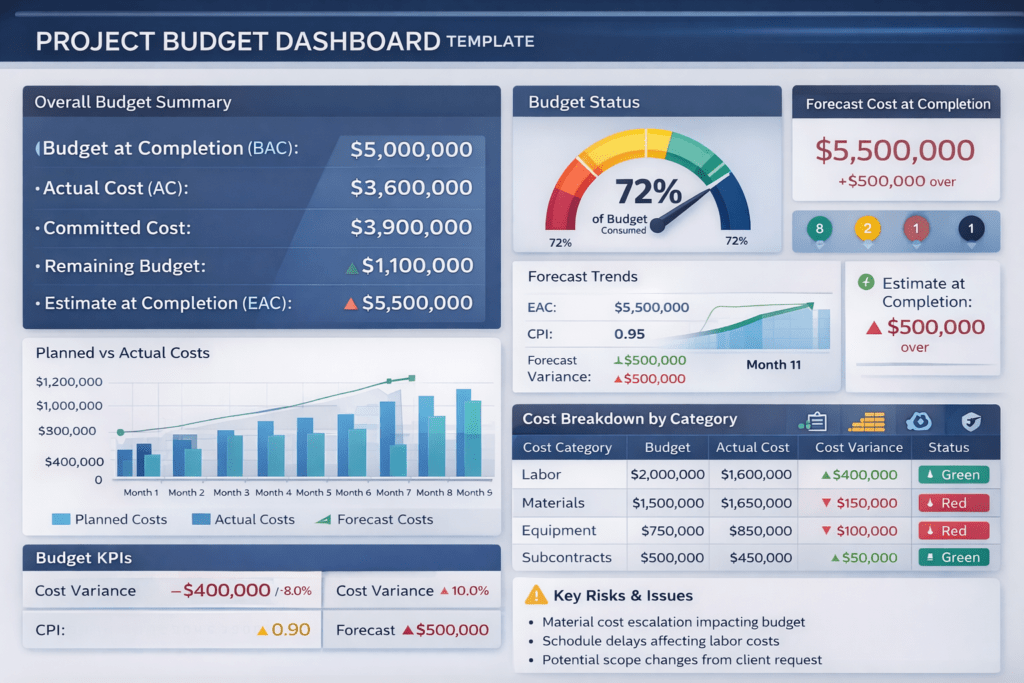


How to Create a Project Budget Dashboard

A project can appear on track while silently drifting toward a budget overrun. This is why a well-designed project budget dashboard is one of the most powerful tools in project management and project controls.

A budget dashboard transforms raw financial data into clear, actionable insights—allowing project managers to detect issues early, communicate effectively with stakeholders, and make data-driven decisions.

This guide explains how to create a project budget dashboard step by step, what metrics to include, common mistakes to avoid, and how AI is enhancing modern budget dashboards.


What Is a Project Budget Dashboard?

A project budget dashboard is a visual reporting tool that summarizes a project’s financial performance in real time or near real time. It consolidates cost data into charts, indicators, and KPIs that show:

  • Planned vs actual costs
  • Forecasted final cost
  • Cost variances and trends
  • Financial risks and exposure

Unlike static spreadsheets, dashboards provide ongoing visibility and support proactive cost management.


Why Budget Dashboards Are Critical for Project Success

Budget dashboards help project teams:

  • Detect cost overruns early
  • Improve financial transparency
  • Support executive decision-making
  • Strengthen accountability
  • Align cost, schedule, and scope

For PMOs and large engineering projects, dashboards are essential for portfolio-level oversight.


Step 1: Define the Purpose and Audience

Before building the dashboard, clarify:

Who Will Use It?

  • Project managers
  • PMO leadership
  • Executives and sponsors

What Decisions Should It Support?

  • Cost corrective actions
  • Funding approvals
  • Change management decisions

An executive dashboard should be high-level, while a project controls dashboard can include more detail.


Step 2: Identify Key Budget Metrics (KPIs)

A strong project budget dashboard focuses on a limited set of meaningful KPIs.

Core Budget Metrics to Include

  • Approved Budget (BAC)
  • Actual Cost (AC)
  • Committed Cost
  • Remaining Budget
  • Estimate at Completion (EAC)
  • Cost Variance (CV)
  • Cost Performance Index (CPI)

These metrics provide a complete picture of current and future financial performance.


Step 3: Integrate Cost and Schedule Data

Budget dashboards are most effective when cost and schedule are integrated.

Examples:

  • Time-phased budgets aligned with the schedule
  • Cost performance linked to progress (earned value)
  • Forecasts adjusted based on schedule delays

This integration is a core principle of project controls best practices.


Step 4: Choose the Right Visualization Types

The way data is displayed matters as much as the data itself.

Recommended Dashboard Visuals

  • Bar charts – Planned vs actual cost
  • Trend lines – Forecast evolution over time
  • Gauge charts – Budget consumption percentage
  • Traffic light indicators – Cost status (green, amber, red)
  • Tables – Detailed cost breakdowns

Avoid clutter—clarity drives adoption.


Pmintelli Dashboard Example

Step 5: Design the Dashboard Layout

An effective layout follows a logical hierarchy:

  1. Top section – Overall budget status and key KPIs
  2. Middle section – Trends and forecasts
  3. Bottom section – Cost breakdowns and notes

Executives should understand the dashboard in less than 30 seconds.


Step 6: Automate Data Updates Where Possible

Manual dashboards quickly become outdated. Use automation to:

  • Pull data from accounting or ERP systems
  • Update forecasts automatically
  • Reduce reporting effort

Automation improves accuracy and frees project teams to focus on analysis instead of data entry.


Step 7: Add Forecasting and Scenario Analysis

A dashboard should not only show what happened—but what is likely to happen.

Advanced dashboards include:

  • Rolling forecasts
  • Best-case and worst-case scenarios
  • Risk-adjusted cost projections

This transforms the dashboard into a decision-support tool.


Common Mistakes to Avoid

  • Too many metrics on one screen
  • No clear link to decision-making
  • Static dashboards that are rarely updated
  • Ignoring forecast accuracy
  • Lack of stakeholder alignment

Simplicity and relevance are key.


How AI Is Enhancing Budget Dashboards

Modern AI-powered budget dashboards can:

  • Predict cost overruns based on trends
  • Detect anomalies in spending
  • Improve forecast accuracy
  • Generate automated insights and alerts

AI enables project managers to move from reactive reporting to predictive cost control.


Best Practices for Effective Budget Dashboards

✔ Focus on decision-driving metrics
✔ Keep visuals simple and intuitive
✔ Integrate cost, schedule, and risk
✔ Update dashboards regularly
✔ Use AI and analytics for forecasting
✔ Align dashboards with governance needs


Final Thoughts

A project budget dashboard is more than a reporting tool—it is a financial control system.

When designed correctly, it improves transparency, strengthens accountability, and enables proactive cost management. As projects grow more complex, dashboards—especially those enhanced by AI—are becoming essential for predictable project delivery.


Project Control Explained

At PM Intelli Hub, we focus on helping project professionals master project management, project controls, and emerging AI tools that drive better decision-making. The following video introduces one of the most critical disciplines in modern project delivery: Project Control.

Project Control is the backbone of successful projects. It provides the structure and visibility needed to manage scope, schedule, cost, and performance—ensuring projects stay aligned with objectives from planning through closeout.

What Is Project Control?

Project Control is a systematic approach to planning, monitoring, and controlling project performance. It transforms raw project data into actionable insights that allow teams to identify risks early, forecast outcomes accurately, and take corrective action before issues impact delivery.

Unlike basic reporting, Project Control integrates:

  • Schedule data (CPM schedules and milestones)
  • Cost data (budgets, commitments, and actuals)
  • Scope definition and change management
  • Performance metrics and forecasting

This integration enables proactive management instead of reactive problem-solving.

Core Elements of Project Control

the following key components form a strong project control framework:

Schedule Control
Monitoring progress against the baseline schedule to identify delays, float erosion, and sequencing issues using CPM scheduling techniques.

Cost Control
Tracking budgets, costs, and forecasts to prevent overruns and support informed financial decisions.

Performance Measurement
Analyzing productivity and efficiency using objective data to evaluate how well the project is performing.

Integrated Project Controls
Aligning scope, schedule, and cost so that changes are evaluated holistically and impacts are clearly understood.

Why Project Control Matters

Effective Project Control allows organizations to:

  • Deliver projects on time and within budget
  • Improve forecast accuracy and predict outcomes earlier
  • Reduce risk through data-driven decision-making
  • Increase transparency for owners, executives, and stakeholders
  • Support claims avoidance and defensible project documentation

In today’s complex projects—especially in construction, infrastructure, and engineering—strong project controls are no longer optional. They are essential.

Who Should Learn Project Control?

Project Control principles apply to:

  • Project Managers and Assistant Project Managers
  • Schedulers and Planning Engineers
  • Cost Engineers and Estimators
  • Owners, PMOs, and Executives
  • Construction, Infrastructure, and Capital Program Teams

At PM Intelli Hub, we emphasize practical, real-world project control knowledge—enhanced with AI tools and automation—to help professionals work smarter and deliver better results.

Final Thoughts

This video serves as an introduction to Project Control as a strategic capability, not just a reporting function. Mastering project controls empowers teams to manage uncertainty, control risk, and consistently achieve successful project outcomes.

Follow PM Intelli Hub for expert insights on project management, project controls, CPM scheduling, cost management, and AI-powered project delivery.


AI in Project Control

For decades, “Project Controls” has often been synonymous with “reporting what happened last month.” We track variances, update schedules, and explain delays—usually after the damage is done.

Artificial Intelligence (AI) is fundamentally changing this dynamic. It is shifting the discipline from forensic analysis (what went wrong?) to predictive analytics (what will go wrong if we don’t act?).

Here is how forward-thinking project teams are using AI to tighten controls and protect margins today.

1. Predictive Scheduling: Beyond the Critical Path

Traditional CPM (Critical Path Method) schedules are static. They assume perfect logic and don’t account for the chaos of reality. AI-driven scheduling tools (like ALICE or Oracle’s Construction Intelligence Cloud) are changing this.

  • Monte Carlo on Steroids: Instead of running one risk analysis at the start, AI tools can simulate thousands of schedule iterations in real-time based on daily progress data.
  • “What-If” Optimization: AI can instantly generate alternative recovery schedules. If a concrete pour is delayed by rain, the AI can propose: “If we add a second crew to the M&E rough-in next week, we can recover the 3 days lost.”
  • Propensity Scoring: AI analyzes historical performance to flag unrealistic durations. If your concrete sub has been late on 80% of their pours in the last 5 years, the AI will flag their 5-day duration in the current schedule as “High Risk,” even if the sub swears they can do it.

2. Automated Cost Intelligence

Cost control often suffers from a lag between “field commitment” and “ERP entry.”

  • Automated Quantity Takeoffs: AI tools can scan 2D drawings and 3D models to generate instant, accurate Bills of Quantities (BOQ). When a revision is issued, the AI highlights exactly what quantities changed and the cost impact, eliminating the manual “spot the difference” game.
  • Cash Flow Forecasting: Machine learning algorithms analyze spending patterns to predict cash flow needs with far greater accuracy than linear spreadsheets, accounting for seasonal dips and supply chain lead times.

3. Visual Project Control (The “Digital Twin”)

The most powerful sensor on a job site is a camera. Computer Vision is turning video footage into hard data.

  • Automated Progress Tracking: 360-degree cameras on hardhats (e.g., OpenSpace, HoloBuilder) walk the site. The AI compares the footage against the BIM model and the schedule. It can automatically determine: “Drywall is 40% complete on Level 3,” and update the schedule percent-complete automatically.
  • Safety Monitoring: AI cameras can scan live feeds to identify safety hazards (missing PPE, workers too close to machinery) and generate “heat maps” of high-risk zones.

4. Risk Management: The Early Warning System

Humans are optimistic; algorithms are not.

  • Unstructured Data Analysis: Projects generate mountains of text—emails, daily logs, RFIs. Natural Language Processing (NLP) can scan this unstructured data to find “sentiment” shifts.

    • Example: If the word “delay” or “waiting” appears 50% more often in the electrical sub’s daily logs this week, the AI flags a potential dispute before a formal claim is ever filed.

  • Supply Chain Prediction: AI tools monitor global shipping data and news to predict material shortages. It can alert you that a port strike in Asia will likely delay your steel delivery by 3 weeks, allowing you to source alternatives months in advance.

5. Implementation: Start Small

You don’t need a million-dollar budget to start.

  1. Clean Your Data: AI is useless without good data. Standardize your cost codes and WBS (Work Breakdown Structure) now.
  2. Automate the “Boring” Stuff: Start with AI tools that automate meeting minutes or daily log transcriptions.
  3. Pilot One Tool: Pick one pain point (e.g., schedule risk analysis) and pilot an AI tool on a single project.

Summary: The AI Advantage

Function Traditional Approach AI-Enhanced Approach
Schedule Static CPM; monthly updates. Dynamic optimization; real-time “what-if” scenarios.
Risk Subjective “Risk Registers.” Data-driven probability analysis based on history.
Progress Manual site walks & clipboards. Computer vision comparing reality to BIM models.
Admin Manual data entry & filing. NLP automation of logs, minutes, and RFIs.

AI doesn’t replace the Project Controller; it promotes them. It removes the drudgery of data entry, freeing up the human expert to do what they do best: make strategic decisions.