Generating a WBS With One AI Prompt
How AI is Transforming Project Planning
Creating a clear, accurate Work Breakdown Structure (WBS) has always been one of the most critical steps in project planning. A good WBS clarifies scope, reduces ambiguity, and builds the foundation for scheduling, and project control. Traditionally, developing a WBS could take hours—or even days—of workshops, iterations, and revisions.
With advancements in AI, you can generate a high-quality WBS in minutes… sometimes with just one prompt.
Why the WBS Matters
A WBS is more than a list of tasks—it is the decomposition of the project’s entire scope into manageable components. A well-structured WBS ensures:
- Complete visibility into all deliverables
- Clear ownership and scope boundaries
- A shared understanding across stakeholders
- Seamless integration with scheduling and cost control
- Reduced risk of scope creep
The challenge has always been how long it takes to get it right.
The Power of One Prompt
AI tools like ChatGPT and Gemini now allow project managers to generate a detailed WBS by simply describing the project or uploading project drawings. With one well-crafted prompt, you can create a structure that includes:
- Phases
- Major deliverables
- Work packages
- Activities or sub-tasks
- Optional: dependencies, responsible roles, and acceptance criteria
This not only accelerates planning—it frees up time for strategic thinking and stakeholder alignment.
Example Prompt
Try something like:
“Create a Work Breakdown Structure for a wastewater treatment plant upgrade project. Include Level 1 through Level 4 numbering, define major deliverables, and format the results as a hierarchical list.”
Using Gemini, within seconds, you receive a complete WBS that is 80–90% ready to use as follows.
This Work Breakdown Structure (WBS) outlines a comprehensive upgrade for an existing Wastewater Treatment Plant (WWTP). It is organized by project phase and discipline, drilling down to specific actionable work packages at Level 4.
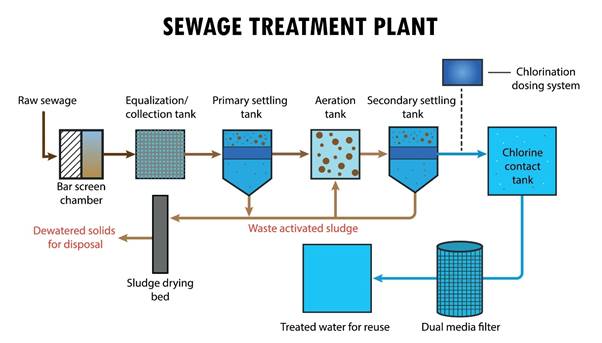
Image Source: Shutterstock
1.0 Wastewater Treatment Plant (WWTP) Upgrade Project
- 1.1 Project Management & Administration
- 1.1.1 Project Planning & Controls
- 1.1.1.1 Project Management Plan (PMP) Development
- 1.1.1.2 Master Schedule Development (CPM)
- 1.1.1.3 Cost Estimation & Budgeting
- 1.1.2 Regulatory & Permitting
- 1.1.2.1 Environmental Impact Assessment (EIA)
- 1.1.2.2 NPDES Permit Modification
- 1.1.2.3 Local Building & Grading Permits
- 1.1.3 Stakeholder Management
- 1.1.3.1 Monthly Progress Reporting
- 1.1.3.2 Public Community Meetings
- 1.1.1 Project Planning & Controls
- 1.2 Engineering & Design
- 1.2.1 Preliminary Design
- 1.2.1.1 Basis of Design Report (BODR)
- 1.2.1.2 Hydraulic Profile Calculations
- 1.2.1.3 Process Simulation Modeling
- 1.2.2 Detailed Design
- 1.2.2.1 Civil & Site Drawings (30/60/90%)
- 1.2.2.2 Process Mechanical Drawings (30/60/90%)
- 1.2.2.3 Electrical & Instrumentation Drawings (30/60/90%)
- 1.2.3 Bid Documents
- 1.2.3.1 Technical Specifications
- 1.2.3.2 Issued for Construction (IFC) Drawings
- 1.2.1 Preliminary Design
- 1.3 Procurement
- 1.3.1 Major Process Equipment
- 1.3.1.1 Headworks Screens & Compactors
- 1.3.1.2 High-Efficiency Turbo Blowers
- 1.3.1.3 Membrane Bioreactor (MBR) Modules
- 1.3.1.4 UV Disinfection Banks
- 1.3.2 Contractor Services
- 1.3.2.1 General Contractor Solicitation
- 1.3.2.2 Electrical Subcontractor Selection
- 1.3.2.3 SCADA Integrator Selection
- 1.3.1 Major Process Equipment
- 1.4 Site Work & Civil Construction
- 1.4.1 Site Preparation
- 1.4.1.1 Mobilization & Temp Facilities
- 1.4.1.2 Erosion & Sediment Control Install
- 1.4.2 Demolition & Bypass
- 1.4.2.1 Temporary Bypass Pumping Setup
- 1.4.2.2 Demolition of Existing Clarifier Mechanisms
- 1.4.2.3 Removal of Decommissioned Piping
- 1.4.3 Yard Piping
- 1.4.3.1 Excavation & Trenching
- 1.4.3.2 Installation of Interconnecting Process Pipe
- 1.4.3.3 Backfill & Compaction
- 1.4.1 Site Preparation
- 1.5 Concrete & Structural
- 1.5.1 Headworks Structure
- 1.5.1.1 Channel Modifications & Re-profiling
- 1.5.1.2 Equipment Pad Pouring
- 1.5.2 Aeration Basins
- 1.5.2.1 Wall Repair & Coating
- 1.5.2.2 Baffle Wall Construction
- 1.5.3 Solids Handling Building
- 1.5.3.1 Structural Steel Framing
- 1.5.3.2 Roof Decking & Installation
- 1.5.1 Headworks Structure
- 1.6 Process Mechanical Installation
- 1.6.1 Primary Treatment
- 1.6.1.1 Mechanical Bar Screen Installation
- 1.6.1.2 Grit Removal System Installation
- 1.6.2 Secondary Treatment (Biological)
- 1.6.2.1 Fine Bubble Diffuser Installation
- 1.6.2.2 Air Header Piping & Valve Install
- 1.6.2.3 Return Activated Sludge (RAS) Pump Install
- 1.6.3 Tertiary & Disinfection
- 1.6.3.1 Filter Feed Pump Installation
- 1.6.3.2 UV Channel Equipment Install
- 1.6.1 Primary Treatment
- 1.7 Electrical, Instrumentation & Controls (EI&C)
- 1.7.1 Power Distribution
- 1.7.1.1 Main Switchgear Upgrade
- 1.7.1.2 Motor Control Centers (MCC) Installation
- 1.7.1.3 Variable Frequency Drives (VFD) Mounting
- 1.7.2 Instrumentation
- 1.7.2.1 Flow Meter & Level Sensor Install
- 1.7.2.2 Dissolved Oxygen (DO) Probe Install
- 1.7.3 SCADA System
- 1.7.3.1 PLC Panel Fabrication & Landing
- 1.7.3.2 Fiber Optic Network Ring Loop
- 1.7.3.3 HMI Screen Programming
- 1.7.1 Power Distribution
- 1.8 Commissioning & Closeout
- 1.8.1 Testing & Startup
- 1.8.1.1 Hydrostatic Testing of Basins/Pipes
- 1.8.1.2 Dry Testing (Motors/Rotation Check)
- 1.8.1.3 Wet Testing (Clean Water)
- 1.8.1.4 Process Startup (Seeding Biology)
- 1.8.2 Training & Documentation
- 1.8.2.1 Operator Training Sessions
- 1.8.2.2 O&M Manual Compilation
- 1.8.2.3 As-Built Drawings
- 1.8.1 Testing & Startup
You can then refine, edit, or expand further based on your team’s expertise.
Benefits of AI-Generated WBS
✔ Faster Project Initiationg
What usually takes several meetings can now be drafted in minutes.
✔ Standardized Structure Across Projects
Using AI helps enforce consistency across your portfolio.
✔ Jumpstart for Stakeholder Workshops
Start with a draft rather than a blank page—saving hours of discussion.
✔ Better for Early Estimates and Proposals
Proposal teams and estimators can quickly align scope before building schedules and costs.
Best Practices for Success
To get high-quality WBS output from a single prompt:
- Provide context (industry, project size, key objectives).
- Specify desired WBS levels (e.g., Level 1–3 or 1–4).
- Ask for format: numbered hierarchy, table, or outline.
- Mention assumptions or constraints if known.
- Use clear, direct language.
The better the input, the better the WBS.
AI Won’t Replace Project Managers—But It Will Empower Them
AI doesn’t eliminate the need for expertise. Instead, it enhances the PM’s ability to work faster, focus on what matters most, and improve the quality of planning artifacts. A WBS still needs human validation, stakeholder alignment, and tailoring to the organization’s processes.
But starting with a smart, AI-generated draft gives project teams a major strategic advantage.
Final Thoughts
Generating a Work Breakdown Structure used to be a slow, manual process. Now, with AI, you can create a detailed, structured WBS with one prompt—accelerating project initiation, improving quality, and enabling teams to focus on strategic decision-making rather than administrative work.
If you’re a project manager, estimator, scheduler, or project controls professional, integrating AI into your WBS development process is no longer optional—it’s the new competitive standard.